
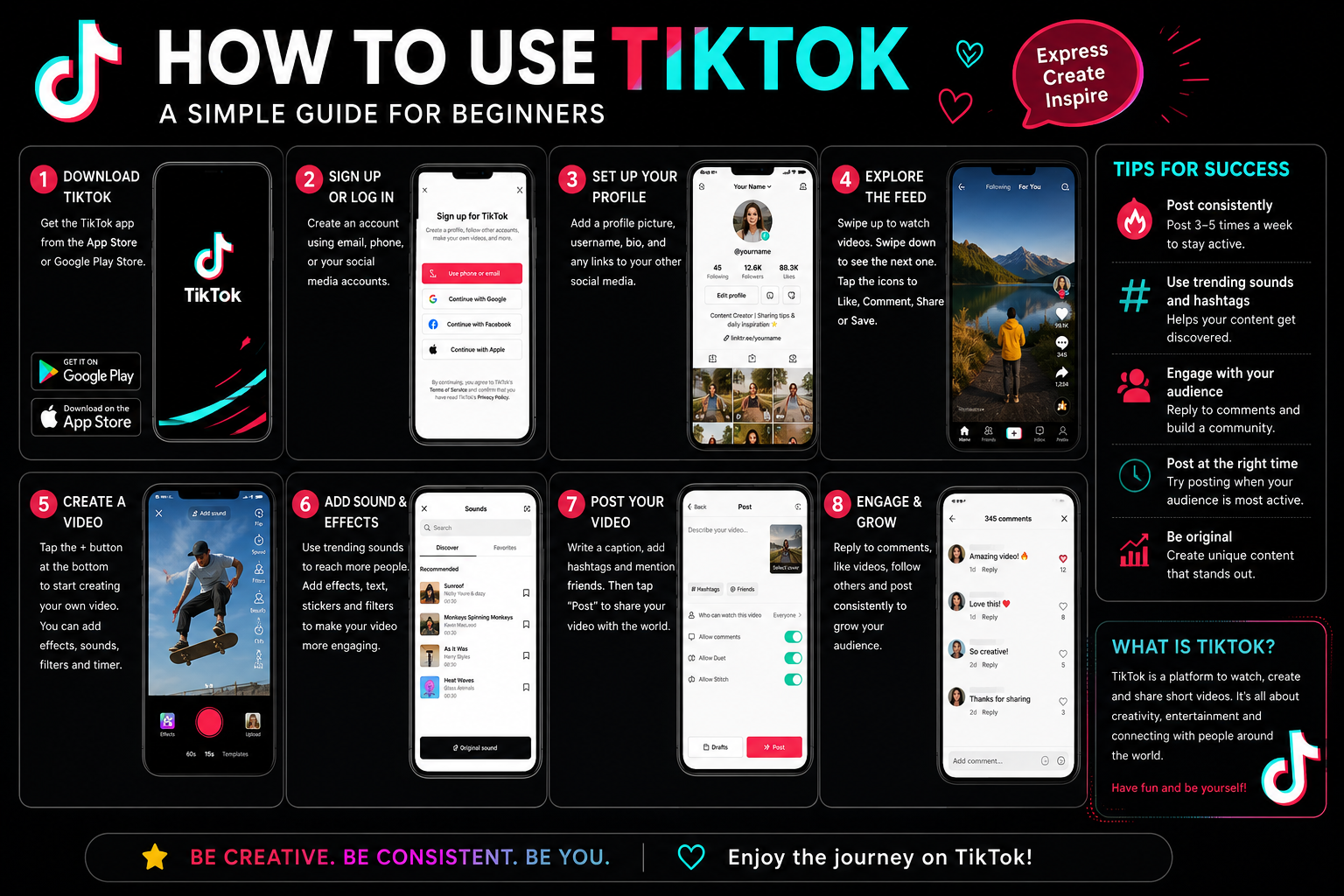
TikTok can look overwhelming when you first open it. There are videos appearing one after another, unfamiliar icons, trending sounds, hashtags, effects, comments, and plenty of features to explore. The good news is that you don’t need to understand everything at once.
Whether you want to watch entertaining videos, learn something new, follow creators, make videos, promote a business, or simply understand how the app works, learning the basics is straightforward.
This guide explains how to use TikTok for beginners, including how to create an account, navigate the app, search for content, customize your For You feed, create videos, use popular features, manage privacy, and start using TikTok confidently.
What Is TikTok and How Does It Work?
TikTok is a social media platform built around discovering and sharing video content. You can use it as a viewer without ever posting anything, or you can create your own videos and build an audience.
The main experience revolves around the For You feed, which How to Use TikTok personalizes according to your interests and interactions. TikTok says activities such as watching, liking, commenting on, and sharing similar content can influence what appears in your feed.
You can use TikTok to:
- Watch short-form videos
- Search for topics and creators
- Follow accounts
- Like, comment on, and share posts
- Save useful content
- Discover sounds and trends
- Create videos, photos, or text posts
- Interact with other users
- Promote a personal brand or business
For example, someone interested in SEO could search for “SEO tips,” follow experienced creators, save useful tutorials, and eventually publish their own SEO videos.
How to Create a TikTok Account
If you’re learning how to use TikTok on your phone, start by installing the official How to Use TikTok app on your device and opening it.
Sign Up for TikTok
Follow the signup process shown in the app and choose an available registration method. After creating your account, you’ll be able to customize your profile and begin exploring TikTok.
Choose a Good Username
Your username should be easy to remember. If you’re creating an account for a business or personal brand, consider using a name related to your topic.
For example:
Good: @TechWithAlex
Less useful: @alex_728394
Add a Profile Photo and Bio
Your profile photo should be recognizable, especially if you plan to build an audience.
Keep your bio short and explain what people can expect from your account.
Example:
SEO Tips | AI Tools | Digital Marketing
How to Use TikTok current profile settings include options for changing your profile photo, nickname, username, and language preferences.
How to Navigate TikTok
Once your account is ready, spend a few minutes learning the main areas of the app.
| TikTok Area | What It Does |
|---|---|
| For You | Shows personalized recommendations |
| Following | Shows content from accounts you follow |
| Search | Finds videos, creators, sounds, and topics |
| Create (+) | Lets you make a post |
| Inbox | Shows notifications and messages |
| Profile | Manages your account and posts |
The exact layout can change as How to Use TikTok updates its app, but these functions form the foundation of using TikTok.
For You Page
The For You Page, often called FYP, is the personalized feed you normally see when opening TikTok.
The more you interact with content, the better TikTok can understand your interests. TikTok also provides a “Why this post” option that can explain some reasons a video was recommended.
Following Feed
The Following feed helps you keep up with accounts you’ve chosen to follow.
If you only want content from specific creators, following relevant accounts can make your How to Use TikTok experience easier to manage.
Search
Use Search when you have something specific in mind.
You might search for:
- “best AI tools”
- “easy cooking recipes”
- “SEO tutorial”
- “football highlights”
- “phone reviews”
You can also discover creators, hashtags, sounds, and other content through TikTok’s discovery features.
Inbox and Profile
The Inbox is where you’ll find notifications and, where available, direct messages and other activity.
Your Profile contains your account information, posts, followers, following list, and settings.
How to Improve Your TikTok For You Page
One of the most useful things to learn as a beginner is how to influence the content you see.
If your FYP is full of videos you don’t enjoy, don’t assume you’re stuck with them.
Interact With Content You Like
Watch and interact with content that genuinely interests you. Following relevant creators and searching for specific topics can also help How to Use TikTok understand your preferences.
Use “Not Interested”
If you repeatedly see content you don’t want, How to Use TikTok provides a Not interested option that can reduce similar recommendations. How to Use TikTok also provides tools such as keyword filters, Manage Topics, and the ability to refresh the For You feed.
Example
Suppose you want more technology content.
Search for technology topics, watch useful technology videos, follow creators in that niche, and interact with content you actually want to see.
Over time, your recommendations can become more relevant.
How to Watch and Interact With TikTok Videos
You don’t need to become a creator to get value from How to Use TikTok.
When watching a video, you can usually:
- Like it
- Comment
- Follow the creator
- Share it
- Save it when the relevant option is available
- Explore its sound
- Visit the creator’s profile
TikTok also allows users to download certain videos to their device when the creator permits downloads. To download an available video, open the post, tap Share, and select Save video.
Remember that downloading a video doesn’t automatically give you permission to reuse or republish it elsewhere.
How to Search on TikTok
How to Use TikTok search is useful when you know exactly what you want.
Instead of searching for a broad term like:
food
try something more specific:
best restaurants in Karachi
Similarly, instead of:
SEO
try:
technical SEO tips for beginners
Specific searches can make it easier to find relevant tutorials, creators, products, and discussions.
Search for Creators
Enter a person’s name, brand, or username to find accounts.
Search for Hashtags
Hashtags can help you discover videos around a particular topic.
Search for Sounds
If you hear an interesting sound in a video, opening the sound can help you discover other content using it.
How to Make Your First TikTok Video
Creating your first How to Use TikTok may seem difficult, but the basic process is simple.
Step 1: Tap the Add Post Button
Open the TikTok app and tap the Add Post (+) button.
TikTok’s current camera tools include options such as camera direction, speed, video length, timer, flash, and zoom.
Step 2: Record or Upload Content
You can record directly in How to Use TikTok or upload existing media from your device.
Don’t worry about making your first video perfect. A simple introduction or useful tip is enough.
Step 3: Edit Your Video
TikTok provides editing tools for working with clips, adjusting speed, adding media, effects, covers, and other elements.
You can add:
- Text
- Sounds
- Effects
- Filters
- Captions
- Additional clips
- A cover
Step 4: Write a Useful Caption
Your caption should tell viewers what the video is about.
For example:
5 beginner SEO mistakes you should avoid.
Step 5: Post or Save as a Draft
If you’re ready, publish the video. If you want to make changes later, save it as a draft.
How to Use TikTok currently supports multiple post formats, including video, photo, and text posts.
TikTok Features Every Beginner Should Know
| Feature | What It Means | Useful For |
|---|---|---|
| Sounds | Audio used with content | Music and trends |
| Effects | Creative visual tools | Making videos interesting |
| Filters | Visual adjustments | Changing appearance |
| Duet | Side-by-side video | Reactions and collaboration |
| Stitch | Combines part of another video with yours | Commentary |
| Stories | Temporary updates | Quick updates |
| LIVE | Real-time broadcasts | Community interaction |
| Favorites | Saves content for later | Research and reference |
TikTok’s current Help Center identifies Duet as a side-by-side video format and Stitch as a way to combine another TikTok with a video you’re creating. Availability and privacy controls can depend on the post and account settings.
How to Use Duet and Stitch
What Is Duet?
Duet lets you create a video alongside another creator’s video.
A simple example is reacting to a tutorial while the original video appears next to yours.
What Is Stitch?
Stitch lets you use part of another How to Use TikTok as part of a new video.
For example, you could use the beginning of someone’s question and then record your own explanation.
Both features depend on the original creator’s settings, so you may not see them on every video.
How to Use TikTok Without Posting
This is important for people who only want to browse.
You can use TikTok to:
- Watch entertainment
- Learn skills
- Follow experts
- Research products
- Discover recipes
- Find tutorials
- Follow news and trends
- Save useful videos
- Share interesting content
For example, a student could use TikTok to find mathematics explanations without ever uploading a video.
You don’t need followers or a creator strategy to benefit from the platform.
How to Manage TikTok Privacy and Safety
Before becoming active on How to Use TikTok , spend a few minutes reviewing your privacy settings.
TikTok currently provides controls for public and private accounts, direct messages, comments, Duet, Stitch, post visibility, video downloads, location information, and other privacy options.
Public vs. Private Account
A private account gives you greater control over who can follow you and interact with your content.
If you’re using TikTok primarily with friends or family, review this setting before posting.
Control Comments and Messages
Review who can comment on your posts and who can contact you.
You can also block accounts that you don’t want interacting with you.
Manage Video Downloads
Creators can control whether other users can download their posts. If the download option isn’t available on a video, the creator may have disabled it.
Protect Personal Information
Avoid publicly sharing sensitive information such as your home address, private phone number, passwords, financial details, or documents.
Also be careful when clicking links or responding to suspicious messages.
How to Use TikTok for Business
How to Use TikTok isn’t only for entertainment. Businesses can use it to build awareness, educate potential customers, demonstrate products, and develop a recognizable brand.
Start With a Clear Topic
A business should know what its audience wants to learn or watch.
For example, a clothing store could create:
- Styling tips
- Product demonstrations
- Behind-the-scenes videos
- Customer FAQs
- New-arrival videos
An SEO agency could publish short tutorials, SEO mistakes, keyword research tips, and website optimization advice.
Focus on Useful Content
Don’t make every video a sales pitch.
Educational and entertaining content can help establish trust before you ask viewers to buy something.
If you’re interested in how to use TikTok to make money, remember that monetization options, eligibility, and availability can vary by location and account. TikTok currently provides separate creator and monetization resources, so check the platform’s latest requirements rather than relying on outdated claims.
How to Grow on TikTok as a Beginner
There is no guaranteed formula for going viral.
Instead, focus on fundamentals:
- Choose a clear topic.
- Understand your audience.
- Make useful or entertaining videos.
- Start with a strong opening.
- Use relevant keywords naturally.
- Engage with genuine comments.
- Study which content performs well.
- Improve your videos over time.
Consistency is useful, but quality and relevance matter more than simply posting as often as possible.
Avoid copying creators word-for-word. Study successful formats, then add your own experience, perspective, examples, or expertise.
Common TikTok Mistakes Beginners Should Avoid
New users often make a few predictable mistakes.
Posting without a clear purpose: Decide whether you’re entertaining, educating, documenting, or promoting something.
Using irrelevant hashtags: More hashtags don’t automatically make a video better.
Chasing every trend: A trend is only useful when it fits your audience or topic.
Ignoring privacy: Review your settings before posting personal content.
Expecting instant growth: Building an audience usually takes experimentation and patience.
Copying other creators: Inspiration is useful, but original value is what makes an account worth following.
A Simple 30-Minute TikTok Beginner Routine
If you’re completely new, try this:
First 5 minutes: Set up your profile and review privacy settings.
Next 10 minutes: Explore the For You feed and search for three topics you genuinely enjoy.
Next 5 minutes: Follow useful creators and save interesting content.
Next 5 minutes: Explore the Create button, sounds, effects, and editing tools.
Final 5 minutes: Record a simple video and save it as a draft if you’re not ready to publish.
This approach lets you learn the platform without feeling pressured to become a creator immediately.
Frequently Asked Questions
How do you use TikTok for the first time?
Download the app, create an account, set up your profile, explore the For You feed, search for topics you like, and interact with relevant content. Once you’re comfortable, try creating a short video.
Can I use TikTok without posting videos?
Yes. You can watch videos, search for topics, follow creators, like content, comment, save available content, and share posts without becoming a creator.
Is TikTok free to use?
The core How to Use TikTok experience is generally free to access, although some features, purchases, or monetization-related services may have separate requirements or costs.
How do I make my TikTok feed better?
Interact with content you genuinely enjoy, follow relevant creators, search for topics you’re interested in, and use tools such as Not Interested, keyword filters, Manage Topics, or feed refresh when appropriate.
What is the difference between Duet and Stitch?
Duet places your video alongside another creator’s video, while Stitch lets you incorporate part of another TikTok into a new video. Both depend on available permissions.
Can I use TikTok for business?
Yes. Businesses can use TikTok to publish educational content, demonstrate products, build brand awareness, communicate with audiences, and explore available commercial tools.
Is TikTok available on iPhone and Android?
How to Use TikTok is available on major mobile platforms, although specific features and availability can vary by device, location, account type, and app version.
Conclusion
Learning how to use TikTok doesn’t require mastering every feature on your first day. Start with the basics: create your account, understand the For You feed, search for useful content, follow creators, and learn how the main buttons work.
Once you’re comfortable, experiment with creating videos, sounds, effects, Duet, Stitch, and other tools. If you’re using TikTok for business or personal branding, focus on providing useful content instead of chasing every trend.
Most importantly, review your privacy settings and use the platform intentionally. With a little practice, you’ll quickly move from wondering How to Use TikTok works to using it confidently.
You May Also Read: Satya Nadella and Floyd Mayweather